The Join via Code button in Black Ops 7 sits next to Invite Player in the lobby, and it is easy to miss. No tutorial screen mentions it and Activision has not written a single support article about it, which is why we get asked about this constantly in our Discord. Here is where the button lives, how to share your own code, and the one setting that stops a correct code from working.
We know the feeling, because we lost about five minutes to it ourselves, clicking around the lobby before spotting that small squared icon next to Invite Player. Once you know where it is, it takes two seconds.
- Where it is: a small squared “join via code” button next to Invite Player in the lobby, and the same option in the Social menu under Party & Friends.
- Your code: five characters, letters and numbers, under Party Code > Your Party Code.
- Does it change: no, not while your party stays up. Only a game restart changes it.
- First thing to check: your party privacy setting, not your code.
How to Join a Party Using a Code
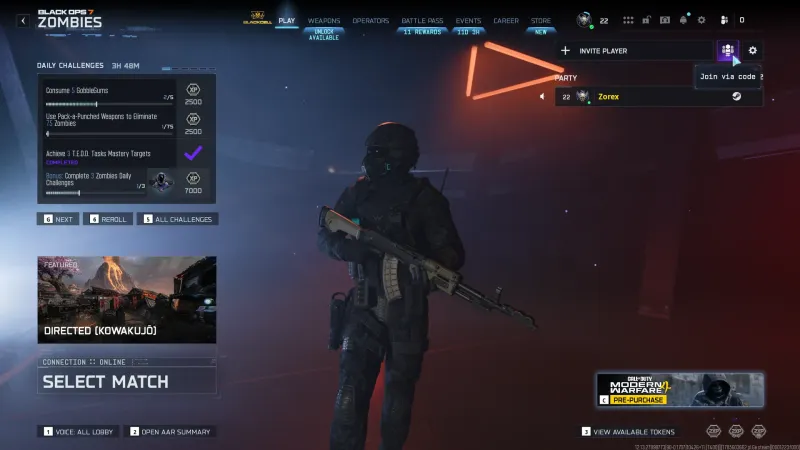
Open the lobby and look at the row of icons above your name, under “Party.” A small squared button sits between Invite Player and the settings gear, labeled Join via Code. Click it, type the five character code your friend sent you, and confirm.
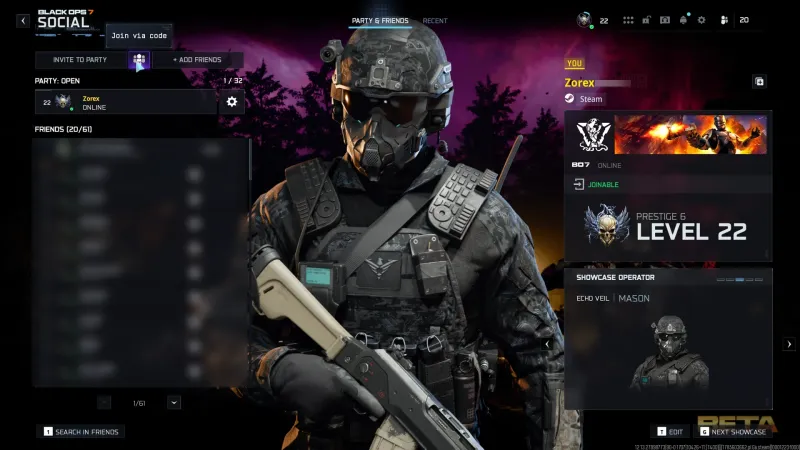
The Social menu has the same option. Open Social, and under Party & Friends you will find the same squared icon next to Invite to Party and Add Friends.
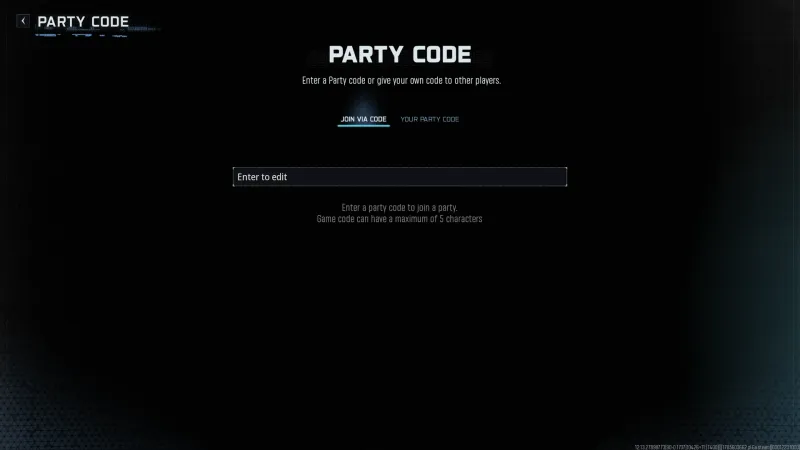
Both routes open the same entry screen. It reads “Game code can have a maximum of 5 characters,” which is confusing wording, because you are in the party code menu and not in a private match. Type the code, confirm, and you land in the party according to the host’s privacy setting. That setting decides more than most people expect.
How to Find and Share Your Own Party Code
Open the same Party Code menu and switch to the Your Party Code tab. Your code sits there in plain view: five characters, letters and numbers. Ours read 62WLL.
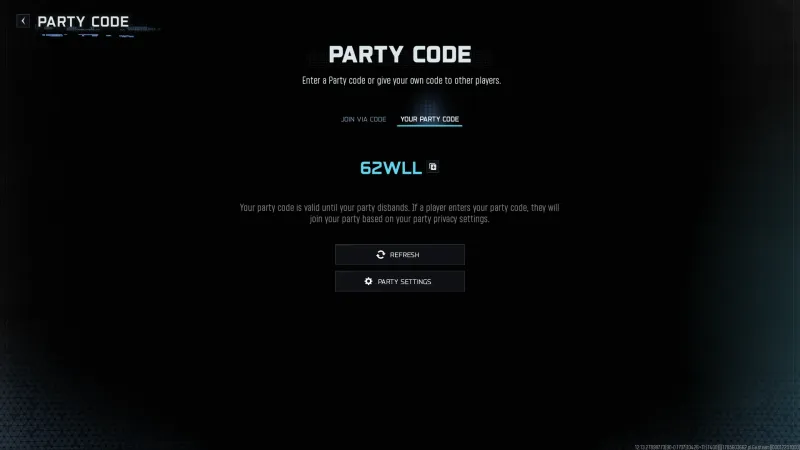
Copy it with the icon beside the code and send it however you talk to your friends. There is no other in-game share option.
The code holds while your party stays up. The screen says so itself: your party code is valid until your party disbands. We tested it. Leaving and rejoining our own party kept the same code, and only a full relaunch of the game produced a new one. So if a friend’s code suddenly stops working, the party disbanded or somebody restarted. There is no silent expiry timer.
Party Privacy Settings and Why a Code Fails
This is the most likely reason a correct code still fails, and there are two privacy screens in BO7 that are easy to mix up.
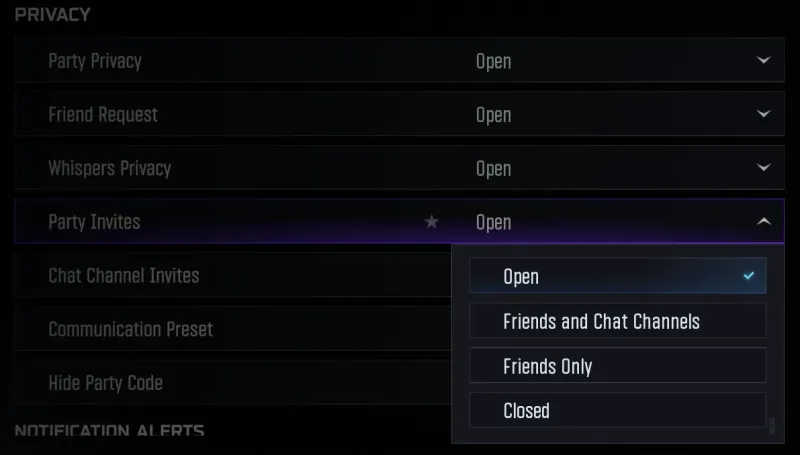
The first is Account and Network > Privacy, holding Party Privacy, Friend Request, Whispers Privacy and Party Invites. Those govern who can find and message you at all. A Hide Party Code toggle sits in the same list, so check that one if your code does not show up for you.
The screen that actually decides whether a code works is Party Settings, in the lobby. It offers five levels: Open, Friends and Chat Channels, Friends Only, Invite or Code Only, and Closed. Only Invite or Code Only is built around a code, as shown in this walkthrough, and Closed shuts the party regardless of what you send.
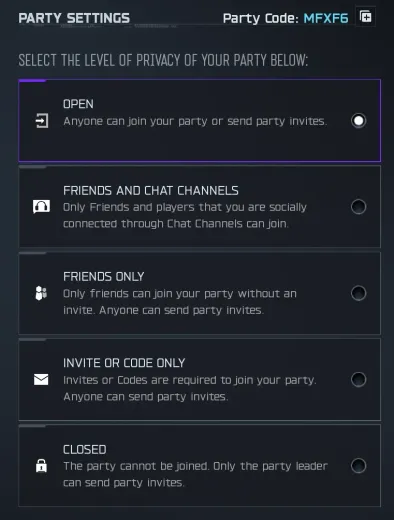
We have not tested a join under each of the five levels ourselves, so treat that as read off the menu rather than off our own attempts. If a code fails, this screen is still the first place to look.
If the Code Still Won’t Work
We have never had a join fail with a correct code and the right privacy setting, but the BO7 subreddit says it happens. Activision is no help here: its Black Ops 7 support hub lists 20 articles and not one covers parties, codes or joining friends.
The complaint we see most is a false crossplay warning:
“It says my friend has crossplay disabled when i have it enabled which isn’t the case we both have our crossplay turned on but it won’t let us join each other unless we restart our game,” according to u/Deep-Fox7517.
We have not hit this one ourselves, so we cannot say how often it happens. Restarting is the only workaround that thread confirmed, and nobody called it a real fix. Others report a code that has never worked once, on PC, with an open NAT and no crossplay involved, and that thread produced no fix either. Worth knowing before you spend an hour on something that may not be on your end.
Do not confuse any of this with the generic “Failed to join [name]’s party” message. That is matchmaking noise, not a code problem.
Frequently Asked Questions
Where do I find the Join via Code button in BO7?
A small squared icon next to Invite Player in the lobby, in the row above your name. The Social menu has the same option under Party and Friends.
What does a BO7 party code look like?
Five characters, letters and numbers mixed. Yours sits under Party Code, on the Your Party Code tab. Ours read 62WLL.
Does my BO7 party code change over time?
No, not while your party stays up. Leaving and rejoining our own party kept the same code. Only relaunching the game produced a new one.
Why will a valid party code not let someone join?
Almost always the privacy setting rather than the code. Closed and Friends Only block a correct code, so use Open or Invite or Code Only.
Is the party code the same as the private match game code?
No, two different systems. The party code pulls someone into your social party. The private match game code belongs to a custom lobby you host through Find a Match, then Private Match.
